Build Any Form in Minutes — StickyEvent's Free Form Builder Is Here
StickyEvent's free Form Builder lets you create surveys, RSVPs, registration forms, feedback forms and more — no coding, no cost, no limits.
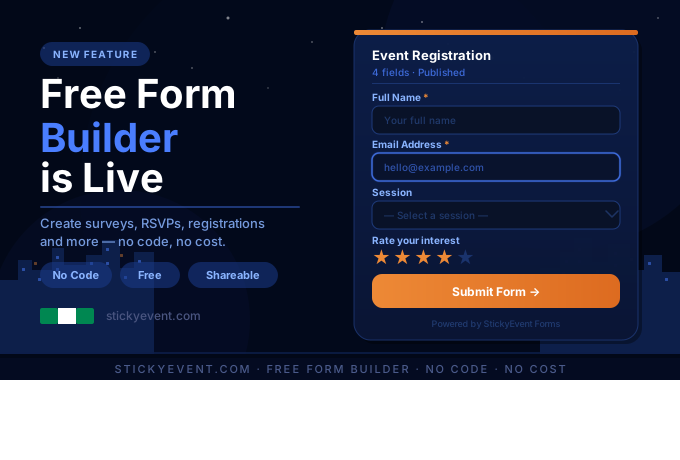
We built StickyEvent to make event management simpler, smarter, and more accessible for everyone. Today we're excited to launch one of the most requested features since day one — a fully free, no-code Form Builder available to every StickyEvent user. You can even embed it directly into your own website!
No subscriptions to get started. No paywalls. No technical skills required.
Whether you're organising a local community event, managing a corporate conference, or just need a quick survey, our Form Builder gives you everything you need to collect information from the people that matter to you.
━━━━━━━━━━━━━━━━━━━━━━━━━━━
WHAT IS THE STICKYEVENT FORM BUILDER?
━━━━━━━━━━━━━━━━━━━━━━━━━━━
The StickyEvent Form Builder is a no-code tool built directly into your dashboard. Design, publish, and manage forms of any kind — from a simple one-question feedback form to a detailed multi-section event registration workflow.
Every form you create gets:
✔ A unique public shareable link
✔ Embed support for your own website
✔ A live response dashboard to track submissions in real time
✔ Full mobile responsiveness out of the box
And yes — it's completely free for every registered StickyEvent user.
━━━━━━━━━━━━━━━━━━━━━━━━━━━
WHAT CAN YOU BUILD WITH IT?
━━━━━━━━━━━━━━━━━━━━━━━━━━━
The Form Builder is flexible enough to handle almost any data collection scenario. Here are just some of the forms you can build today:
1. Event Registration Forms
Collect attendee names, emails, dietary requirements, ticket preferences, and anything else you need before your event. Set required fields, add dropdowns for session choices, and let guests register in under a minute.
2. RSVP Forms
Simple yes/no attendance confirmations or detailed RSVPs with plus-one options, meal selections, and special requests. Perfect for weddings, private dinners, and exclusive events.
3. Feedback & Post-Event Surveys
Gather star ratings, written reviews, and multiple-choice responses after your event. Understand what worked, what didn't, and what your audience wants next time.
4. Vendor & Speaker Applications
Collecting applications for market stalls, speaker slots, or sponsorship enquiries? Build a structured intake form that captures exactly what you need from each applicant.
5. Waitlist & Interest Sign-Ups
Not ready to go public yet? Drop a waitlist form on your event page and start building your audience before tickets are even on sale.
6. Volunteer Sign-Up Forms
Recruit and organise volunteers by collecting their availability, skills, experience, and contact details — all in one tidy place.
7. Contact & Enquiry Forms
Add a professional enquiry form to your event listing so sponsors, media, or partners can reach you directly without cluttering your inbox.
8. Additional Data Collection Alongside Ticketing
Collect supplementary attendee information at the point of registration — shirt sizes, meal preferences, accessibility needs, seating preferences — paired seamlessly with your ticketing workflow.
If you need to collect information from people, the Form Builder can handle it.
━━━━━━━━━━━━━━━━━━━━━━━━━━━
HOW IT WORKS — STEP BY STEP
━━━━━━━━━━━━━━━━━━━━━━━━━━━
Getting your first form live takes about three minutes. Here's exactly how it works:
STEP 1 — Go to My Forms
Log in to your StickyEvent account and click "My Forms" in the navigation. This is your central hub for creating and managing every form you build.
STEP 2 — Create a New Form
Click "New Form", give it a name, and add an optional description. The description appears at the top of your public-facing form, so use it to give respondents context on what they're filling in.
STEP 3 — Add Your Fields
Click "Add Field" to start building. You have a full library of field types to choose from:
TEXT INPUTS
• Text — short answers: names, locations, job titles
• Textarea — longer responses: bios, comments, feedback
• Email — with built-in format validation
• Phone — for contact numbers
• Number — quantities, ages, seat counts (with optional min/max)
• URL — for websites or portfolio links
• Password — for access-controlled or gated forms
CHOICE FIELDS
• Dropdown — single selection from a custom list
• Radio Buttons — single choice displayed openly
• Checkboxes — multiple selections from a list
• Toggle — simple on/off or yes/no switches
DATE & TIME
• Date
• Time
• Date & Time combined
MEDIA & FILES
• Star Rating — 1 to 5 stars (or a custom maximum)
• File Upload — accept CVs, images, documents, or any file type you specify
• Image Upload — photo-specific upload field
LAYOUT & STRUCTURE
• Heading — section titles to organise longer forms
• Paragraph — instructional or descriptive text blocks
• Divider — clean visual separators between sections
• Hidden Field — carry data silently without showing it to the user
STEP 4 — Configure Each Field
Every field has its own settings. Add placeholder text, help hints beneath the field, and default values. Mark fields as required or optional. For dropdowns, radio buttons, and checkboxes, type in your own custom options. For number fields, set minimum and maximum values. For file uploads, restrict the accepted file types. Each field type surfaces only the options relevant to it — no clutter.
STEP 5 — Reorder & Organise
Drag fields up and down to rearrange your form at any time. Use Heading and Divider fields to break longer forms into logical sections, making them easier to complete on both desktop and mobile.
STEP 6 — Publish & Share
When your form looks exactly right, hit Publish. You instantly get:
→ A unique public URL to share anywhere (email, social media, WhatsApp, event listings)
→ An embed snippet to drop the form directly into any webpage
→ A QR code you can print and display at physical events
STEP 7 — Track Responses
Every submission lands in your Responses dashboard the moment it's submitted. View individual responses in full, see breakdowns by field, and export your data to CSV whenever you need it. No waiting, no syncing — it's all live.
━━━━━━━━━━━━━━━━━━━━━━━━━━━
WHY IT'S FREE
━━━━━━━━━━━━━━━━━━━━━━━━━━━
We believe the tools that power great events should be accessible to everyone — not just organisations with large budgets. The StickyEvent Form Builder is free because when your events succeed, you'll keep coming back. No tricks, no hidden upgrade tiers, no response limits that kick in at the worst moment.
Create as many forms as you need. Collect as many responses as you receive. It's all included.
━━━━━━━━━━━━━━━━━━━━━━━━━━━
GET STARTED TODAY
━━━━━━━━━━━━━━━━━━━━━━━━━━━
If you already have a StickyEvent account, your Form Builder is live right now. Head to My Forms in your dashboard and create your first form today.
Not registered yet? Sign up for free at StickyEvent and get instant access to the Form Builder alongside our full suite of event management tools — ticketing, attendee tracking, notifications, referrals, and more.
We can't wait to see what you build.
— The StickyEvent Team